library(forecastbaselines)
library(scoringutils)
library(ggplot2)
setup_ForecastBaselines()
#> Instantiating Julia project: /home/runner/work/_temp/Library/forecastbaselines/julia
#> Starting Julia ...
#> Loading Julia bridge: forecast_helpers.jl
#> forecastbaselines setup complete!
Overview
forecastbaselines provides 10 baseline forecasting models across three categories:
- Simple Baselines - Naive methods for benchmarking
- Seasonal/Trend Models - For patterned data
- Advanced Time Series Models - Statistical models
This vignette provides:
- Detailed description of each model
- When to use each model
- Parameter guidance
- Practical examples
- Performance characteristics
Model Selection Guide
Quick Decision Tree
Do you have seasonal patterns?
├─ Yes, strong seasonality
│  ├─ Regular pattern → STLModel(s = period)
│  ├─ Irregular pattern → LSDModel(window_width, s = period)
│  └─ Need decomposition → STLModel(s = period)
├─ No, mostly trend
│  ├─ Polynomial trend → OLSModel(degree)
│  ├─ Step changes → IDSModel(window_size)
│  └─ Complex trend → ARMAModel(p, q)
└─ No clear pattern
   ├─ Need simple baseline → ConstantModel()
   ├─ Sample from history → MarginalModel()
   └─ Smooth estimates → KDEModel()

Special cases:
- Count data (integers) → INARCHModel(p)
- Multiple components → ETSModel(error_type, trend_type, season_type)
- Quick benchmark → ConstantModel()
Model Comparison Table
| Model | Complexity | Data Needs | Seasonality | Trend | Prob. Forecasts |
|---|---|---|---|---|---|
| Constant | Very Low | Minimal (1+) | No | No | Via residuals |
| Marginal | Very Low | 30+ | No | No | Direct |
| KDE | Low | 50+ | No | No | Direct |
| LSD | Low | 2+ cycles | Yes | No | Via residuals |
| OLS | Low | 20+ | No | Yes | Via residuals |
| IDS | Low | 20+ | No | Yes | Via residuals |
| STL | Medium | 2+ cycles | Yes | Yes | Via residuals |
| ARMA | Medium | 50+ | No | No | Parametric |
| INARCH | Medium | 50+ | Yes | No | Parametric |
| ETS | High | 50+ | Yes | Yes | Parametric |
1. Simple Baseline Models
These models provide quick, interpretable forecasts and serve as benchmarks for more complex methods.
1.1 Constant Model (Naive Forecast)
Description: The simplest possible forecast - uses the last observed value for all future predictions.
Mathematical Form:
When to Use:
- ✅ Quick baseline for model comparison
- ✅ Random walk data (financial prices, etc.)
- ✅ When you need fast, simple forecasts
- ❌ Data with trends or seasonality
Parameters: None - completely parameter-free.
Example:
# Generate random walk data
set.seed(123)
data <- cumsum(rnorm(100))

# Fit constant model
model <- ConstantModel()
fitted <- fit_baseline(data, model)

# Forecast
fc <- forecast(fitted, interval_method = NoInterval(), horizon = 1:10)

# Visualize
n_data <- length(data)
plot_df <- rbind(
  data.frame(time = 1:n_data, value = data, type = "Observed"),
  data.frame(time = 101:110, value = fc$mean, type = "Forecast")
)

ggplot(plot_df, aes(x = time, y = value)) +
  geom_line(aes(color = type), linewidth = 1) +
  geom_hline(yintercept = data[100], linetype = "dashed", color = "red", alpha = 0.5) +
  scale_color_manual(values = c("Observed" = "black", "Forecast" = "red")) +
  labs(title = "Constant Model: Random Walk Forecast", x = "Time", y = "Value", color = NULL) +
  theme_minimal() +
  theme(legend.position = "top")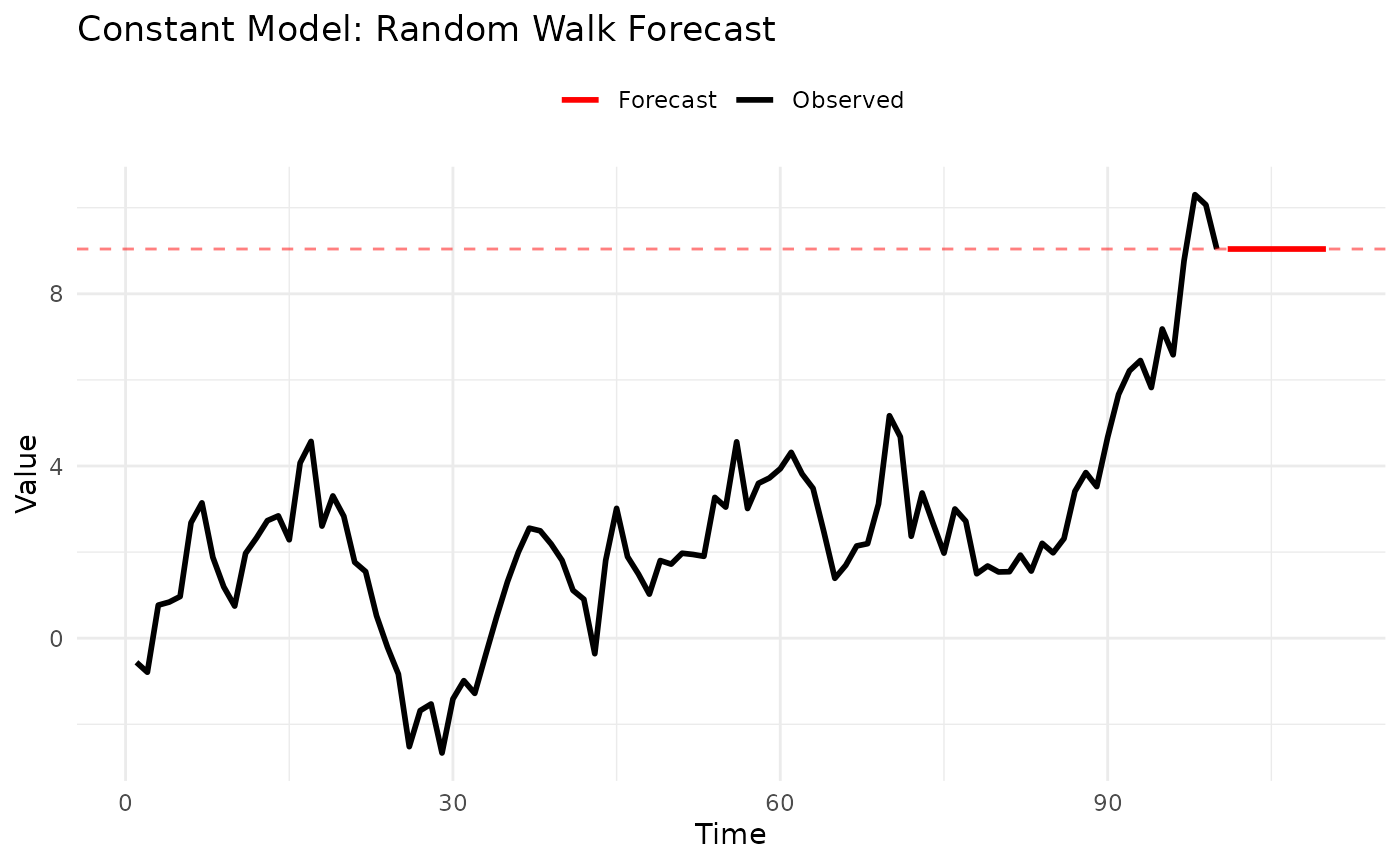
Strengths:
- Extremely fast
- No parameters to tune
- Optimal for random walks
- Easy to explain
Limitations:
- Ignores all patterns
- Flat forecast function
- Poor for trending/seasonal data
1.2 Marginal Model
Description: Forecasts by randomly sampling from the empirical distribution of the observed data.
Mathematical Form:
When to Use:
- ✅ Stationary data without autocorrelation
- ✅ Need probabilistic forecasts
- ✅ Distribution shape matters more than sequence
- ❌ Trending or seasonal patterns
- ❌ Strong autocorrelation
Parameters: None
Example:
# Generate stationary data
set.seed(123)
data <- rnorm(100, mean = 50, sd = 10)

# Fit marginal model
model <- MarginalModel()
fitted <- fit_baseline(data, model)

# Forecast with prediction intervals
fc <- forecast(
  fitted,
  interval_method = EmpiricalInterval(n_trajectories = 1000),
  horizon = 1:10,
  levels = c(0.5, 0.95),
  model_name = "Marginal"
)

# The forecast mean approximates the historical mean
cat("Historical mean:", mean(data), "\n")
#> Historical mean: 50.90406
cat("Forecast mean:", mean(fc$mean), "\n")
#> Forecast mean: 50.90406

# Quantile forecasts are now available for scoring
set.seed(124)
truth <- 50 + rnorm(10, 0, 10)  # Simulated future values
fc_truth <- add_truth(fc, truth)

# Convert to quantile format and show structure
fc_quantile <- scoringutils::as_forecast_quantile(fc_truth)
print(head(fc_quantile, 15))  # Show first few quantiles
#>     observed predicted quantile_level horizon    model
#>        <num>     <num>          <num>   <int>   <char>
#>  1: 36.14929  33.76226          0.025       1 Marginal
#>  2: 36.14929  45.25548          0.250       1 Marginal
#>  3: 36.14929  51.31836          0.500       1 Marginal
#>  4: 36.14929  58.49046          0.750       1 Marginal
#>  5: 36.14929  72.09168          0.975       1 Marginal
#>  6: 50.38323  33.63193          0.025       2 Marginal
#>  7: 50.38323  45.92043          0.250       2 Marginal
#>  8: 50.38323  52.43278          0.500       2 Marginal
#>  9: 50.38323  58.97530          0.750       2 Marginal
#> 10: 50.38323  72.09168          0.975       2 Marginal
#> 11: 42.36970  33.63193          0.025       3 Marginal
#> 12: 42.36970  45.12309          0.250       3 Marginal
#> 13: 42.36970  50.76936          0.500       3 Marginal
#> 14: 42.36970  57.41528          0.750       3 Marginal
#> 15: 42.36970  70.98152          0.975       3 Marginal
Strengths:
- Captures full distribution
- Natural uncertainty quantification
- No distributional assumptions
Limitations:
- Ignores temporal dependence
- Requires sufficient data (30+)
- Constant forecast on average
Use Case: Benchmark for comparing autocorrelation benefits. If ARMA doesn’t beat Marginal, your data may not have useful autocorrelation.
1.3 KDE Model (Kernel Density Estimation)
Description: Similar to Marginal but uses kernel density estimation for smoother probability distributions.
Mathematical Form:
where is a kernel function and is bandwidth.
When to Use:
- ✅ Need smooth probability estimates
- ✅ Continuous data
- ✅ Multi-modal distributions
- ❌ Small sample sizes (< 50)
- ❌ Discrete/count data
Parameters: None (bandwidth selected automatically)
Example:
# Generate bimodal data
set.seed(123)
data <- c(
  rnorm(50, mean = 20, sd = 3),
  rnorm(50, mean = 40, sd = 3)
)

# Compare Marginal vs KDE
marginal <- fit_baseline(data, MarginalModel())
kde <- fit_baseline(data, KDEModel())

fc_marginal <- forecast(marginal, interval_method = NoInterval(), horizon = 1:100)
fc_kde <- forecast(kde, interval_method = NoInterval(), horizon = 1:100)

# KDE produces smoother samples
# Prepare data for ggplot
marginal_density <- density(fc_marginal$mean)
kde_density <- density(fc_kde$mean)

density_df <- rbind(
  data.frame(x = marginal_density$x, y = marginal_density$y, type = "Marginal"),
  data.frame(x = kde_density$x, y = kde_density$y, type = "KDE")
)

ggplot(density_df, aes(x = x, y = y, color = type)) +
  geom_line(linewidth = 1.5) +
  scale_color_manual(values = c("Marginal" = "red", "KDE" = "blue")) +
  labs(title = "Marginal vs KDE", x = "Forecast Value", y = "Density", color = NULL) +
  theme_minimal() +
  theme(legend.position = "topright")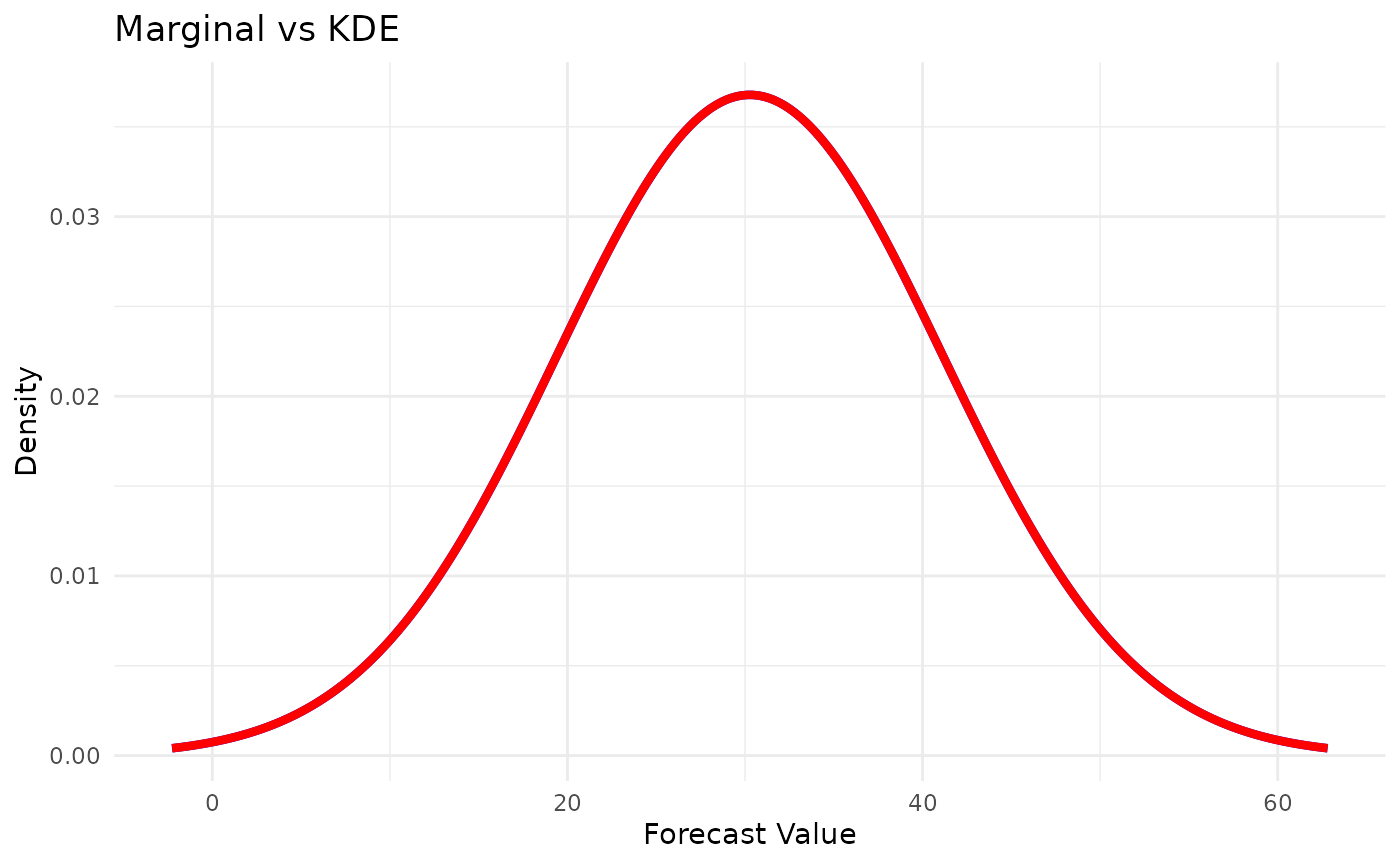
Strengths:
- Smooth probability estimates
- Handles multi-modal data
- Good for continuous distributions
Limitations:
- Needs more data than Marginal (50+)
- Computationally more expensive
- Still ignores autocorrelation
2. Seasonal and Trend Models
For data with identifiable patterns in time.
2.1 LSD Model (Last Similar Dates)
Description: Seasonal model that forecasts by averaging values from similar historical periods.
How It Works:
- For horizon , look back to periods , , etc.
- Average the
windowmost recent similar periods - Handles irregular seasonality well
When to Use:
- ✅ Strong seasonal patterns
- ✅ Seasonality more important than trend
- ✅ Irregular seasonal effects
- ❌ Purely trending data
- ❌ Less than 2 full seasonal cycles
Parameters:
-
window: Number of similar periods to average (default: 1) -
s: Seasonal period (e.g., 12 for monthly, 7 for daily)
Example:
# Monthly data with seasonality
set.seed(123)
months <- 1:240
seasonal_pattern <- 20 + 10 * sin(2 * pi * months / 12)
data <- seasonal_pattern + rnorm(240, sd = 2)

# Fit LSD model
model <- LSDModel(window_width = 3, s = 12) # Average last 3 years
fitted <- fit_baseline(data, model)

# Forecast next year
fc <- forecast(fitted, interval_method = NoInterval(), horizon = 1:12)

# Plot
n_data <- length(data)
plot_df <- rbind(
  data.frame(time = 1:n_data, value = data, type = "Observed"),
  data.frame(time = 241:252, value = fc$mean, type = "Forecast")
)

ggplot(plot_df, aes(x = time, y = value, color = type)) +
  geom_line(linewidth = 1) +
  scale_color_manual(values = c("Observed" = "black", "Forecast" = "red")) +
  labs(title = "LSD Model: Seasonal Forecast", x = "Time", y = "Value", color = NULL) +
  theme_minimal() +
  theme(legend.position = "top")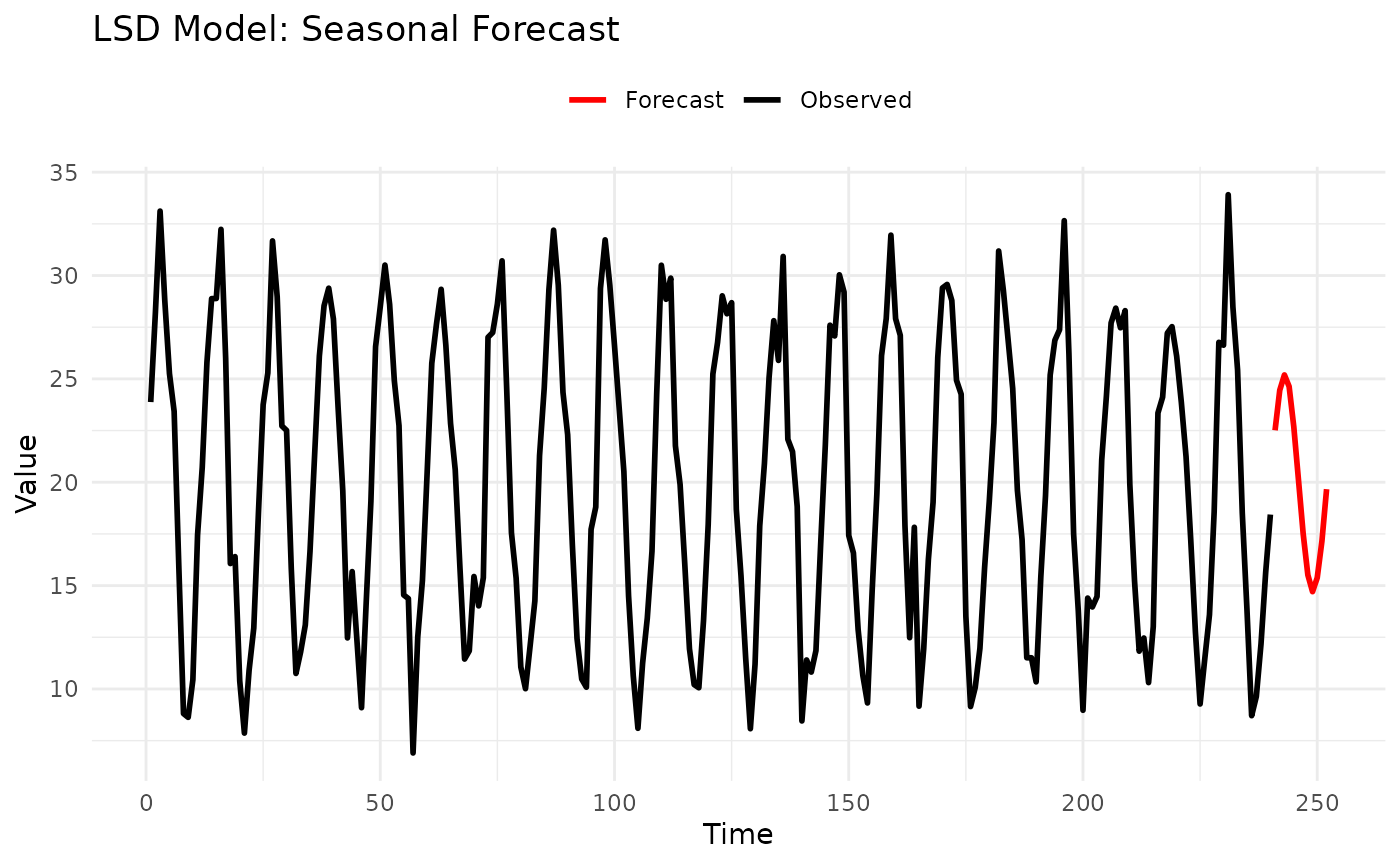
Parameter Guidance:
-
s(seasonal period):- 7 for daily data with weekly patterns
- 12 for monthly data with yearly patterns
- 24 for hourly data with daily patterns
- 52 for weekly data with yearly patterns
-
window(averaging window):- 1: Use only last similar period (more responsive)
- 3-5: Smooth average (more stable)
- Large: Very smooth but less adaptive
Strengths:
- Simple and interpretable
- Handles irregular seasonality
- Fast computation
- Works with little data
Limitations:
- No trend modeling
- Needs at least 2 seasonal cycles
- Fixed seasonal period
2.2 OLS Model (Polynomial Trend)
Description: Fits polynomial trends using ordinary least squares, then forecasts by extrapolating the trend.
Mathematical Form:
When to Use:
- ✅ Clear polynomial trends
- ✅ Smooth, continuous trends
- ✅ Short-term extrapolation
- ❌ Seasonal patterns
- ❌ Long-term forecasts (unstable extrapolation)
Parameters:
-
degree: Polynomial degree (1 = linear, 2 = quadratic, etc.) -
differencing: Order of differencing (default: 0)
Example:
# Generate quadratic trend
set.seed(123)
time <- 1:50
data <- 10 + 2 * time + 0.05 * time^2 + rnorm(50, sd = 3)

# Compare linear vs quadratic
linear <- fit_baseline(data, OLSModel(degree = 1))
quadratic <- fit_baseline(data, OLSModel(degree = 2))

fc_linear <- forecast(linear, interval_method = NoInterval(), horizon = 1:10)
fc_quadratic <- forecast(quadratic, interval_method = NoInterval(), horizon = 1:10)

# Plot
n_data <- length(data)
plot_df <- rbind(
  data.frame(time = 1:n_data, value = data, type = "Data"),
  data.frame(time = 51:60, value = fc_linear$mean, type = "Linear"),
  data.frame(time = 51:60, value = fc_quadratic$mean, type = "Quadratic")
)

ggplot(plot_df, aes(x = time, y = value, color = type)) +
  geom_line(aes(linewidth = type)) +
  scale_linewidth_manual(values = c("Data" = 0.5, "Linear" = 1, "Quadratic" = 1)) +
  scale_color_manual(values = c("Data" = "black", "Linear" = "blue", "Quadratic" = "red")) +
  labs(title = "OLS: Linear vs Quadratic Trend", x = "Time", y = "Value", color = NULL, linewidth = NULL) +
  theme_minimal() +
  theme(legend.position = "top")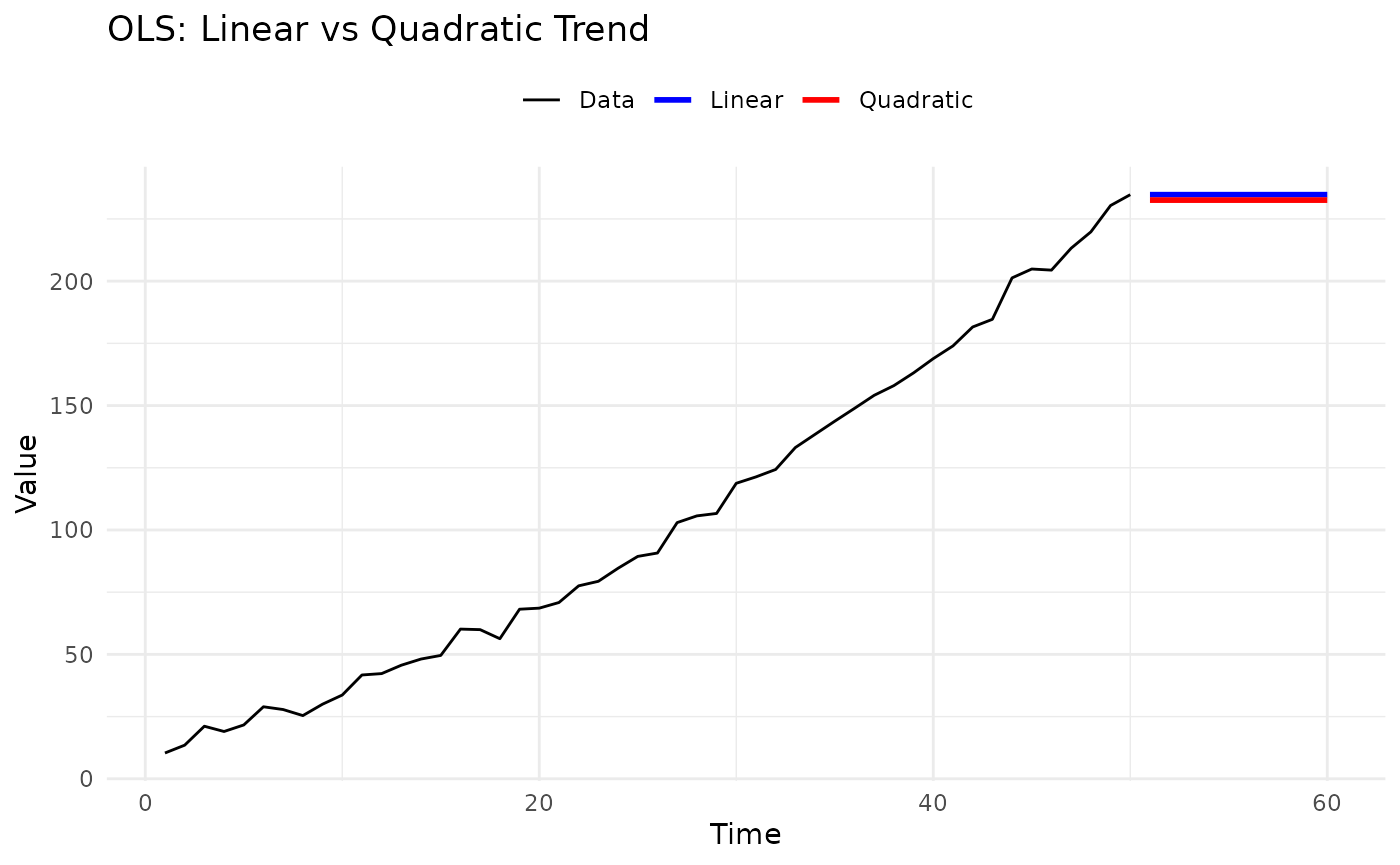
Parameter Guidance:
-
degree:- 1: Linear trend (most common)
- 2: Quadratic (turning point)
- 3: Cubic (S-shaped curves)
- 4+: Rarely recommended (overfitting risk)
-
differencing:- 0: Model in levels
- 1: Model in first differences
- Requires
degree >= differencing + 1
Strengths:
- Simple interpretation
- Fast computation
- Well-understood statistics
Limitations:
- Polynomial extrapolation can be unstable
- No seasonality handling
- Overfitting risk with high degrees
Tips:
- Use degree = 1 (linear) unless there’s clear curvature
- Validate extrapolations carefully
- Consider ARMA for long-term forecasts
2.3 IDS Model (Increase-Decrease-Stable)
Description: Detects trend direction (increasing, decreasing, stable) over recent windows and extrapolates.
How It Works:
- Divide recent history into
pwindows - Classify each window’s trend
- Forecast based on detected pattern
When to Use:
- ✅ Step changes in trend
- ✅ Regime-switching behavior
- ✅ Need trend detection
- ❌ Smooth continuous trends (use OLS)
- ❌ Seasonal patterns
Parameters:
-
window_size: Number of windows to analyze (default: 3) -
threshold: Threshold for detecting changes (default: 0.0)
Example:
# Generate data with trend change
set.seed(123)
data <- c(
  seq(10, 30, length.out = 30), # Increasing
  rep(30, 20) + rnorm(20, sd = 1), # Stable
  seq(30, 50, length.out = 30) # Increasing again
)

# Fit IDS model
model <- IDSModel(window_size = 3) # Analyze last 3 windows
fitted <- fit_baseline(data, model)

# Forecast
fc <- forecast(fitted, interval_method = NoInterval(), horizon = 1:15)

# Plot
n_data <- length(data)
plot_df <- rbind(
  data.frame(time = 1:n_data, value = data, type = "Observed"),
  data.frame(time = 81:95, value = fc$mean, type = "Forecast")
)

ggplot(plot_df, aes(x = time, y = value, color = type)) +
  geom_line(linewidth = 1) +
  geom_vline(xintercept = c(30, 50), linetype = "dashed", alpha = 0.5) +
  scale_color_manual(values = c("Observed" = "black", "Forecast" = "red")) +
  labs(title = "IDS Model: Trend Detection", x = "Time", y = "Value", color = NULL) +
  theme_minimal() +
  theme(legend.position = "top")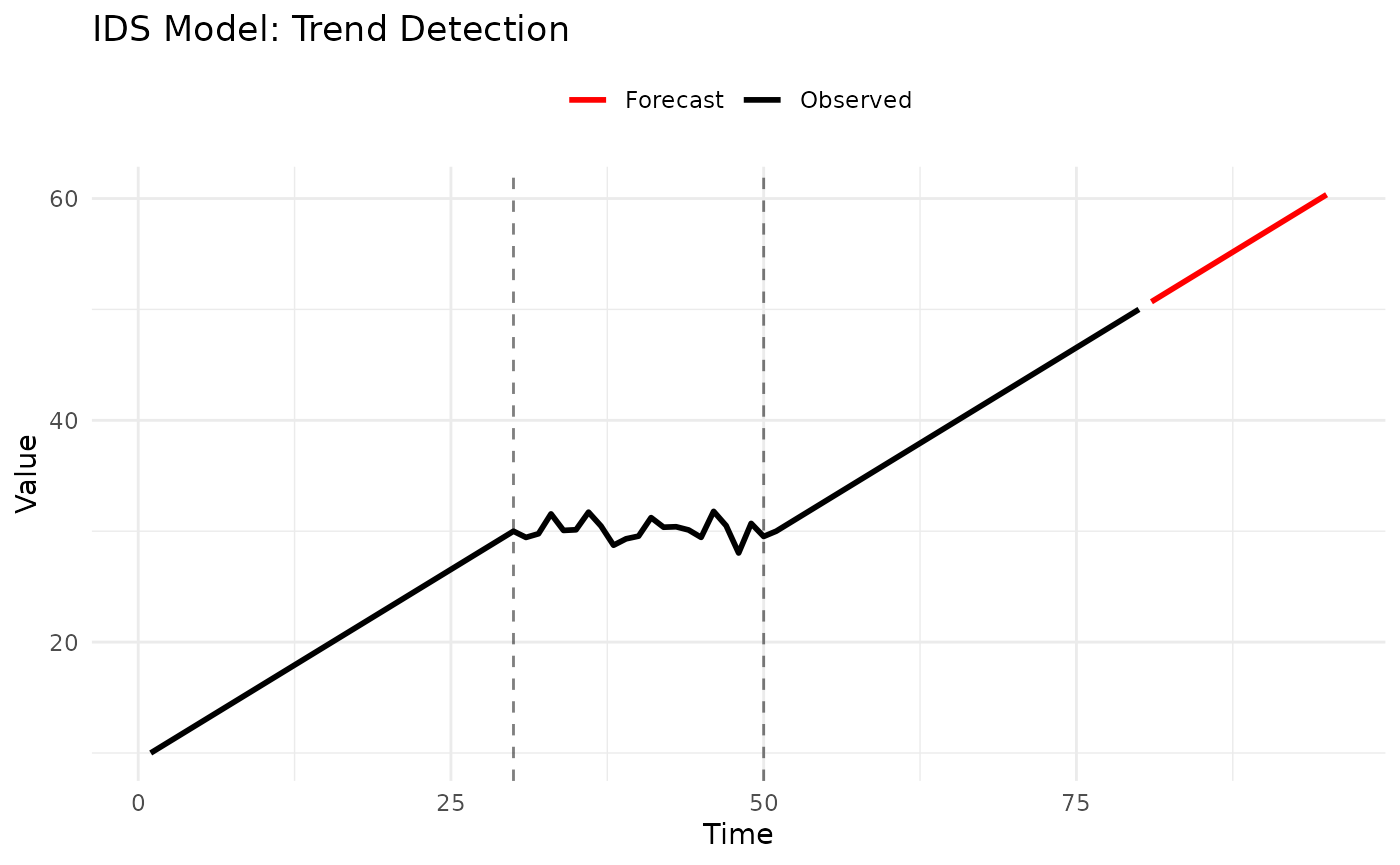
Parameter Guidance:
-
p(number of windows):- 2-3: More reactive to recent changes
- 4-6: More stable, less reactive
- Too large: Misses recent trends
Strengths:
- Detects trend changes
- Adapts to regimes
- Interpretable classifications
Limitations:
- Discrete trend categories
- Needs sufficient data
- No seasonality
2.4 STL Model (Seasonal-Trend Decomposition)
Description: Decomposes series into seasonal, trend, and remainder components using LOESS, then forecasts each separately.
Mathematical Form:
where is trend, is seasonal, is remainder.
When to Use:
- ✅ Both trend AND seasonality
- ✅ Need decomposition for interpretation
- ✅ Regular seasonal patterns
- ❌ Irregular seasonality
- ❌ Less than 2 seasonal cycles
Parameters:
-
s: Seasonal period
Example:
# Generate trend + seasonality
set.seed(123)
time <- 1:240 # 20 years of monthly data
trend <- 0.5 * time
seasonal <- 10 * sin(2 * pi * time / 12)
data <- 50 + trend + seasonal + rnorm(240, sd = 2)

# Fit STL model
model <- STLModel(s = 12)
fitted <- fit_baseline(data, model)

# Forecast next year
fc <- forecast(fitted, interval_method = NoInterval(), horizon = 1:12)

# Plot
n_data <- length(data)
plot_df <- rbind(
  data.frame(time = 1:n_data, value = data, type = "Observed"),
  data.frame(time = 241:252, value = fc$mean, type = "Forecast")
)

ggplot(plot_df, aes(x = time, y = value, color = type)) +
  geom_line(linewidth = 1) +
  scale_color_manual(values = c("Observed" = "black", "Forecast" = "red")) +
  labs(title = "STL Model: Trend + Seasonality", x = "Time", y = "Value", color = NULL) +
  theme_minimal() +
  theme(legend.position = "top")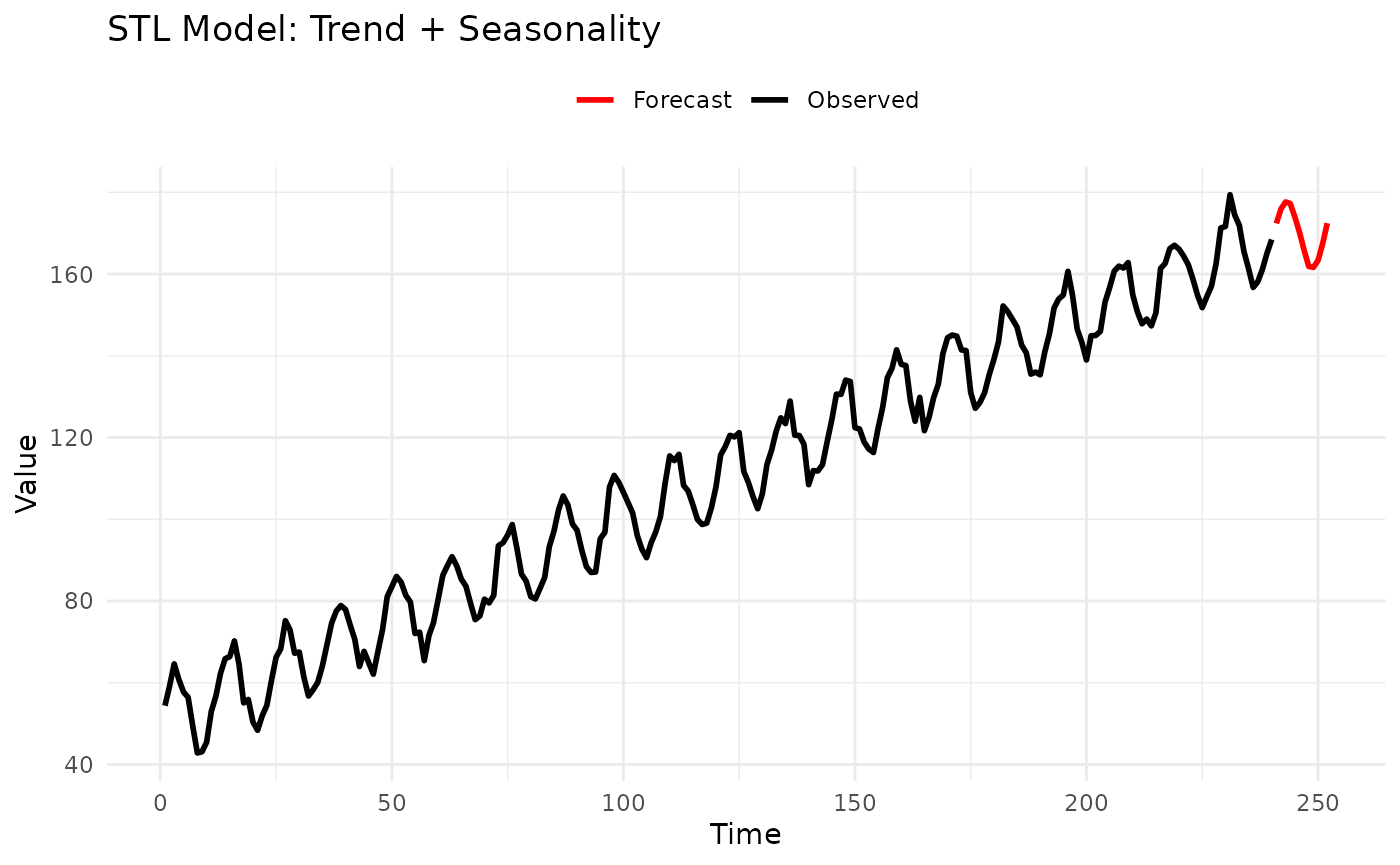
Parameter Guidance:
-
s(seasonal period): Same as LSD model guidance
Strengths:
- Handles trend + seasonality together
- Robust to outliers
- Provides interpretable decomposition
- Can extract components for analysis
Limitations:
- Fixed seasonal period
- Needs at least 2 cycles
- More complex than LSD
Use Case: Preferred over LSD when trend is important, or when you need to analyze seasonal and trend components separately.
3. Advanced Time Series Models
Statistical models with parametric probability distributions.
3.1 ARMA Model (Autoregressive Moving Average)
Description: Classic time series model combining autoregressive (AR) and moving average (MA) components.
Mathematical Form:
where .
When to Use:
- ✅ Stationary time series
- ✅ Need parametric uncertainty
- ✅ Autocorrelation structure
- ❌ Strong trends (use differencing or detrend first)
- ❌ Seasonal patterns (use SARIMA or seasonal models)
Parameters:
-
p: Autoregressive order -
q: Moving average order
Example:
# Generate AR(1) process
set.seed(123)
n <- 200
data <- numeric(n)
data[1] <- rnorm(1)
for (i in 2:n) {
  data[i] <- 0.7 * data[i - 1] + rnorm(1)
}

# Fit ARMA(2,1)
model <- ARMAModel(p = 2, q = 1)
fitted <- fit_baseline(data, model)

# Forecast with prediction intervals
fc <- forecast(
  fitted,
  interval_method = EmpiricalInterval(n_trajectories = 1000),
  horizon = 1:20,
  levels = c(0.5, 0.95),
  model_name = "ARMA(2,1)"
)

# Add simulated truth and visualize with intervals
set.seed(456)
truth <- numeric(20)
truth[1] <- 0.7 * data[200] + rnorm(1)
for (i in 2:20) {
  truth[i] <- 0.7 * truth[i - 1] + rnorm(1)
}

fc_truth <- add_truth(fc, truth)
fc_quantile <- scoringutils::as_forecast_quantile(fc_truth)

# Show quantile forecast structure
print(head(fc_quantile, 15))
#>        observed   predicted quantile_level horizon     model
#>           <num>       <num>          <num>   <int>    <char>
#>  1: -2.64651490 -3.06346875          0.025       1 ARMA(2,1)
#>  2: -2.64651490 -1.77042789          0.250       1 ARMA(2,1)
#>  3: -2.64651490 -1.21971720          0.500       1 ARMA(2,1)
#>  4: -2.64651490 -0.55847786          0.750       1 ARMA(2,1)
#>  5: -2.64651490  0.92350244          0.975       1 ARMA(2,1)
#>  6: -1.23078488 -2.54894033          0.025       2 ARMA(2,1)
#>  7: -1.23078488 -1.33700718          0.250       2 ARMA(2,1)
#>  8: -1.23078488 -0.74279283          0.500       2 ARMA(2,1)
#>  9: -1.23078488 -0.01561537          0.750       2 ARMA(2,1)
#> 10: -1.23078488  1.70207148          0.975       2 ARMA(2,1)
#> 11: -0.06067475 -2.34241843          0.025       3 ARMA(2,1)
#> 12: -0.06067475 -1.11061984          0.250       3 ARMA(2,1)
#> 13: -0.06067475 -0.54841015          0.500       3 ARMA(2,1)
#> 14: -0.06067475  0.19197878          0.750       3 ARMA(2,1)
#> 15: -0.06067475  2.24735108          0.975       3 ARMA(2,1)
Parameter Guidance:
How to choose p and q:
- Plot ACF/PACF (in R):
- ACF/PACF patterns:
- ACF cuts off at lag q → MA(q)
- PACF cuts off at lag p → AR(p)
- Both decay slowly → ARMA(p,q)
- Common starting points:
- ARMA(1,0) = AR(1): Simple persistence
- ARMA(0,1) = MA(1): Single shock memory
- ARMA(1,1): Most parsimonious mixed model
- ARMA(2,2): More flexibility
- General guidance:
- Start small (p=1, q=1)
- Rarely need p or q > 3
- More parameters ≠ better forecasts
Strengths:
- Well-established theory
- Parametric uncertainty
- Efficient for stationary data
- Many diagnostic tools
Limitations:
- Requires stationarity
- Parameter selection can be tricky
- Needs sufficient data (50+)
Tips:
- Detrend before fitting if trending
- Use AIC/BIC for model selection
- Check residuals for white noise
3.2 INARCH Model (Integer ARCH)
Description: Designed for count data (non-negative integers), models conditional mean and variance with ARCH-type dynamics.
Mathematical Form:
When to Use:
- ✅ Count data (0, 1, 2, 3, …)
- ✅ Non-negative integers
- ✅ Overdispersion
- ✅ Time-varying variance
- ❌ Continuous data
- ❌ Negative values
Parameters:
-
p: Order of lags -
s: Seasonal period (optional)
Example:
# Generate count data
set.seed(123)
# Simulate Poisson AR process
lambda <- 10
data <- numeric(100)
data[1] <- rpois(1, lambda)
for (i in 2:100) {
  mu <- 5 + 0.5 * data[i - 1]
  data[i] <- rpois(1, mu)
}

# Fit INARCH(1)
model <- INARCHModel(p = 1)
fitted <- fit_baseline(data, model)

# Forecast
fc <- forecast(fitted, interval_method = NoInterval(), horizon = 1:10)

# Forecasts are counts
print(fc$mean)
#>  [1] 8.771931 9.145271 9.325835 9.413164 9.455401 9.475828 9.485708 9.490486
#>  [9] 9.492797 9.493915
Parameter Guidance:
-
p(lag order):- 1: Most common, captures direct persistence
- 2-3: If ACF shows higher-order dependence
- Rarely need p > 3
-
s(seasonality):- Omit if no seasonality
- Set to period if seasonal counts
Strengths:
- Designed for count data
- Respects non-negativity
- Handles overdispersion
- Seasonal version available
Limitations:
- Only for integer counts
- Requires more data than ARMA
- Limited to Poisson/NegBin distributions
Use Cases:
- Disease counts
- Customer arrivals
- Event occurrences
- Web traffic hits
3.3 ETS Model (Error-Trend-Season)
Description: Exponential smoothing state space models covering 30 different combinations of error, trend, and seasonal components.
Components:
- Error: Additive (A) or Multiplicative (M)
- Trend: None (N), Additive (A), Multiplicative (M), Damped (Ad, Md)
- Season: None (N), Additive (A), Multiplicative (M)
When to Use:
- ✅ Complex seasonal patterns
- ✅ Need automatic model selection
- ✅ Business forecasting
- ✅ Various data characteristics
- ❌ Very short series (< 2 cycles)
- ❌ Need interpretable parameters
Parameters:
-
error: “A” (additive) or “M” (multiplicative) or NULL (auto) -
trend: “N”, “A”, “M”, “Ad”, “Md”, or NULL (auto) -
season: “N”, “A”, “M”, or NULL (auto) -
s: Seasonal period (if seasonal)
Example:
# Generate multiplicative seasonal data
set.seed(123)
time <- 1:72
trend <- 100 + 2 * time
seasonal_mult <- 1 + 0.3 * sin(2 * pi * time / 12)
data <- trend * seasonal_mult * exp(rnorm(72, sd = 0.05))

# Automatic selection
model_auto <- ETSModel()
fitted_auto <- fit_baseline(data, model_auto)

# Specific: Multiplicative error, additive trend, multiplicative season
model_specific <- ETSModel(error_type = "M", trend_type = "A", season_type = "M", s = 12)
fitted_specific <- fit_baseline(data, model_specific)

# Forecast
fc <- forecast(fitted_specific,
  interval_method = NoInterval(),
  horizon = 1:12
)

# Plot
n_data <- length(data)
plot_df <- rbind(
  data.frame(time = 1:n_data, value = data, type = "Observed"),
  data.frame(time = 73:84, value = fc$mean, type = "Forecast")
)

ggplot(plot_df, aes(x = time, y = value, color = type)) +
  geom_line(linewidth = 1) +
  scale_color_manual(values = c("Observed" = "black", "Forecast" = "red")) +
  labs(title = "ETS Model: Complex Seasonality", x = "Time", y = "Value", color = NULL) +
  theme_minimal() +
  theme(legend.position = "top")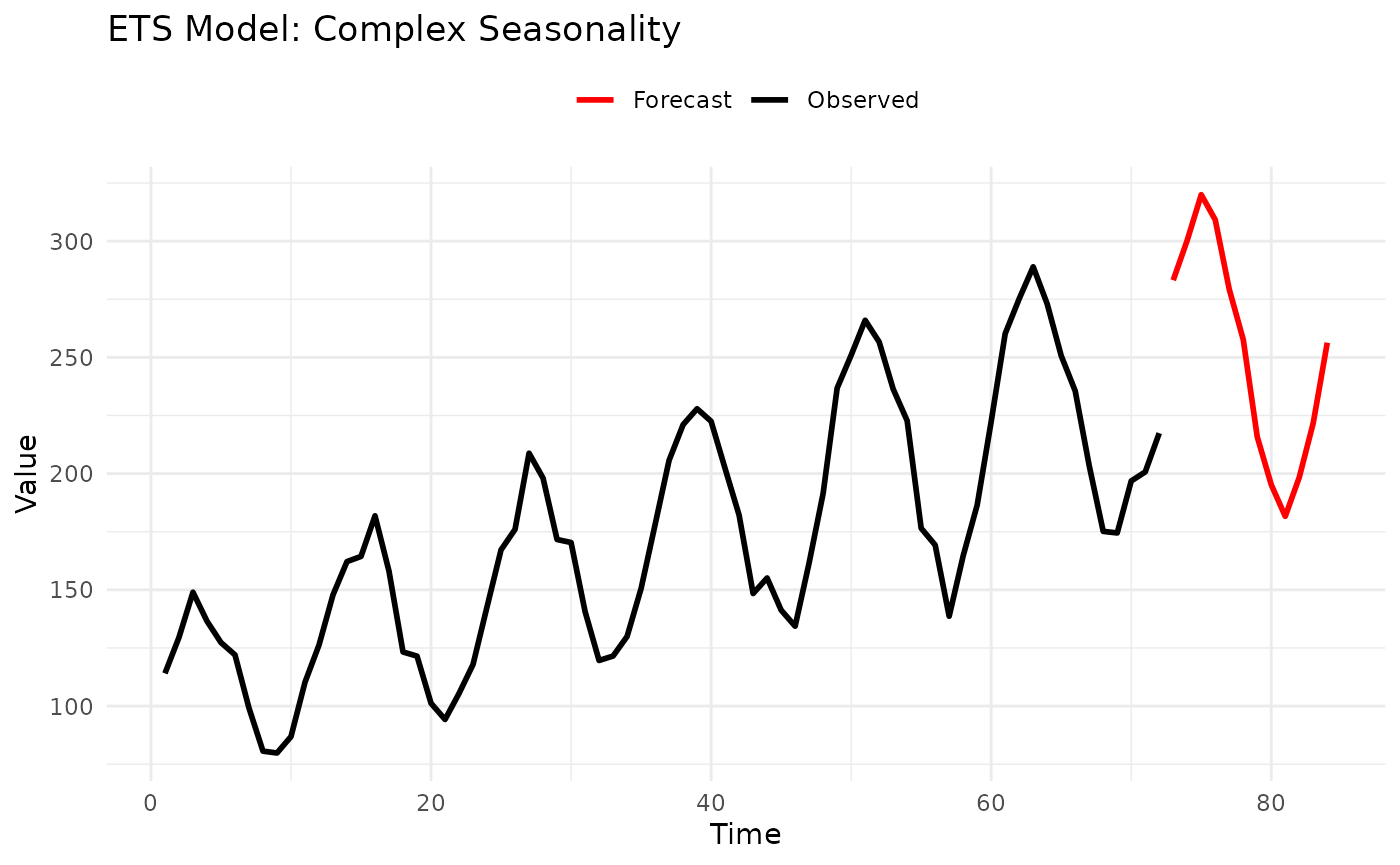
Model Selection Guide:
Error type:
- Additive (A): Errors independent of level
- Multiplicative (M): Errors proportional to level
Trend type:
- None (N): No trend
- Additive (A): Linear trend
- Multiplicative (M): Exponential trend
- Additive Damped (Ad): Trend decays to flat
- Multiplicative Damped (Md): Trend decays exponentially
Season type:
- None (N): No seasonality
- Additive (A): Constant seasonal fluctuation
- Multiplicative (M): Seasonal % of level
Common Models:
-
ETS(A,N,N): Simple exponential smoothing -
ETS(A,A,N): Holt’s linear trend -
ETS(A,A,A): Additive Holt-Winters -
ETS(A,A,M): Multiplicative seasonality -
ETS(M,M,M): Fully multiplicative
Strengths:
- Extremely flexible (30 models)
- Automatic selection available
- Well-tested in practice
- Handles many data types
Limitations:
- Many parameters to choose
- Computationally intensive
- Less interpretable than ARMA
- Can overfit
Tips:
- Start with automatic selection (NULL parameters)
- Use additive for stable variance
- Use multiplicative for percentage seasonality
- Damped trends for long horizons
Model Selection Examples
Example 1: Monthly Sales Data
# Simulated retail sales: trend + seasonality + promotions
set.seed(123)
months <- 1:240
trend <- 1000 + 20 * months
seasonal <- 200 * sin(2 * pi * months / 12) # Holiday peaks
noise <- rnorm(240, sd = 50)
data <- trend + seasonal + noise

# Try multiple models
models <- list(
  Naive = ConstantModel(),
  LSD = LSDModel(window_width = 3, s = 12),
  STL = STLModel(s = 12),
  ETS = ETSModel(error_type = "A", trend_type = "A", season_type = "A", s = 12)
)

# Fit all models
results <- lapply(names(models), function(name) {
  fitted <- fit_baseline(data, models[[name]])
  fc <- forecast(fitted, interval_method = NoInterval(), horizon = 1:12)

  data.frame(
    Model = name,
    Forecast_Mean = mean(fc$mean)
  )
})

comparison <- do.call(rbind, results)
print(comparison)
#>   Model Forecast_Mean
#> 1 Naive      5760.923
#> 2   LSD      3417.800
#> 3   STL      5858.771
#> 4   ETS      5924.238

# Recommendation: STL or ETS for trend + seasonality
Example 2: Website Traffic (Count Data)
# Daily page views (count data)
set.seed(456)
days <- 100
data <- rpois(days, lambda = 100 + 0.5 * 1:days)

# Count-specific models
models <- list(
  Marginal = MarginalModel(), # Ignore trend
  INARCH = INARCHModel(p = 1) # Model count dynamics
)

# Compare
# INARCH should perform better due to trend

# Recommendation: INARCH for count data with patterns
Example 3: Financial Returns
# Daily returns (stationary, no trend/season)
set.seed(789)
data <- rnorm(200, mean = 0.001, sd = 0.02)

# Stationary models
models <- list(
  Marginal = MarginalModel(),
  ARMA = ARMAModel(p = 1, q = 1)
)

# For returns, ARMA captures autocorrelation
# Marginal is baseline

# Recommendation: ARMA if autocorrelation present, else Marginal
Performance Considerations
Summary and Recommendations
Quick Start
Don’t know where to begin?
- Start with
ConstantModel()- it’s fast and shows what “no model” looks like - If you have seasonality, try
STLModel(s = period) - If stationary without seasonality, try
ARMAModel(p = 1, q = 1) - Compare models with
score()functions
Best Practices
- Always use a simple baseline - ConstantModel or Marginal
- Match model to data characteristics:
- Counts → INARCH
- Seasonal → STL or LSD
- Stationary → ARMA
- Complex → ETS
- Validate on holdout data - use
truthparameter - Check residuals - should look like white noise
- Start simple, add complexity only if needed
Further Reading
- See
vignette("forecastbaselines")for basic workflow - See
vignette("transformations")for data preprocessing - Check individual function help:
?ARMAModel,?forecast, etc.
Appendix: Parameter Quick Reference
# Simple Baselines
ConstantModel()
MarginalModel()
KDEModel()

# Seasonal/Trend
LSDModel(window_width = 3, s = 12)
OLSModel(degree = 1, differencing = 0)
IDSModel(window_size = 3)
STLModel(s = 12)

# Advanced
ARMAModel(p = 1, q = 1)
INARCHModel(p = 1, s = NULL)
ETSModel(error_type = "A", trend_type = "N", season_type = "N", s = NULL)